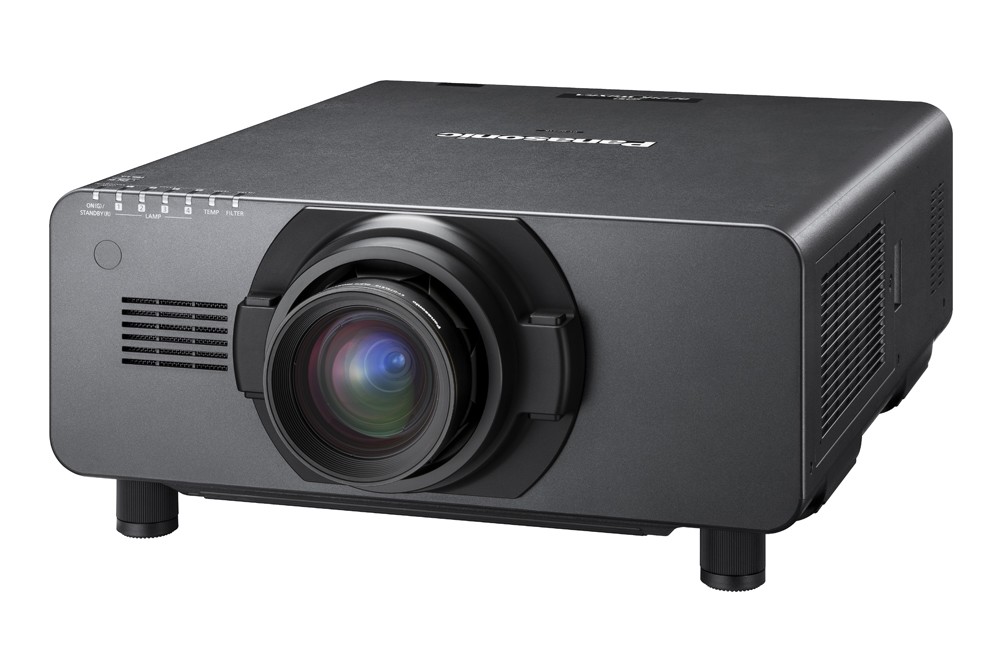
The ET-D75LE1 lens is a standard lens with a ratio of 1.4-1.8:1. The lens is compatible with 3-Chip DLP projectors made by Panasonic.If you have any questions about the compatibility of ET-D75LE1 with your projector model, please contact our sales team by email or phone.How to find the right value?Distance = Image width x RatioImage width = Distance / RatioRatio = Distance / Image widthEncyclopediaf-VALUEf stands for "focal length". Ratio of focal length to aperture. Zoom lenses often have two values. The large apertures are described with small numbers and the small apertures with large numbers. A lens with a smaller focal length lets more light through.IMAGE RATIOAlso projection ratio, ratio, throw. Is the ratio of the projection distance to the image width. Multiplying the number by the screen width is the distance between the projector and the screen. Therefore, the width of the screen can be calculated by dividing the screen distance by the number. If two numbers are given (for example: 1.5-2.5:1), it means that the projector has a zoom lens and the ratio can be changed within the given range.SCREEN SIZE (diagonal)Distance between two diagonally opposite corners.ASPECT RATIOAspect Ratio, the ratio of width to height.IMAGE RESOLUTIONNumber of pixels of the width and height of an image: e.g. 1920×1080With aspect ratio 4:3VGA (Video Graphics Array) 640 × 480 PixelSVGA (Super Video Graphics Array) 800 × 600 PixelXGA (Extended Graphics Array) 1024 × 768 PixelSXGA+ ( Super Extended Graphics Array Plus) 1400 × 1050 PixelUXGA (Ultra Extended Graphics Array) 1600 × 1200 PixelWith aspect ratio 5:4SXGA (Super Extended Graphics Array)With aspect ratio 16:9HD 720 (HD) 1280 × 720 PixelWSXGA (Wide Super Extended Graphics Adapter) 1600 × 900 PixelFULL HD (2K. HD1080. 1080p) 1920 × 1080 PixelQWXGA (Quadruple Wide Extended Graphics Adapter) 2048 × 1152 Pixel2k 2048x1080 Pixel4K-UHD 3840 x 2160 PixelWith aspect ratio 16:10WXGA (Wide Extended Graphics Array) 1280 × 800 PixelWXGA+ (Wide Extended Graphics Array Plus) 1440 × 900 PixelWSXGA (Wide Super Extended Graphics Adapter) 1680 × 1050 PixelWUXGA (Wide Ultra Extended Graphics Array) 1920 × 1200 Pixel
The ET-D75LE10 lens is a standard lens with a ratio of 1.3-1.7:1. The lens is compatible with 3-Chip DLP projectors made by Panasonic.If you have any questions about the compatibility of ET-D75LE10 with your projector model, please contact our sales team by email or phone.How to find the right value?Distance = Image width x RatioImage width = Distance / RatioRatio = Distance / Image widthEncyclopediaf-VALUEf stands for "focal length". Ratio of focal length to aperture. Zoom lenses often have two values. The large apertures are described with small numbers and the small apertures with large numbers. A lens with a smaller focal length lets more light through.IMAGE RATIOAlso projection ratio, ratio, throw. Is the ratio of the projection distance to the image width. Multiplying the number by the screen width is the distance between the projector and the screen. Therefore, the width of the screen can be calculated by dividing the screen distance by the number. If two numbers are given (for example: 1.5-2.5:1), it means that the projector has a zoom lens and the ratio can be changed within the given range.SCREEN SIZE (diagonal)Distance between two diagonally opposite corners.ASPECT RATIOAspect Ratio, the ratio of width to height.IMAGE RESOLUTIONNumber of pixels of the width and height of an image: e.g. 1920×1080With aspect ratio 4:3VGA (Video Graphics Array) 640 × 480 PixelSVGA (Super Video Graphics Array) 800 × 600 PixelXGA (Extended Graphics Array) 1024 × 768 PixelSXGA+ ( Super Extended Graphics Array Plus) 1400 × 1050 PixelUXGA (Ultra Extended Graphics Array) 1600 × 1200 PixelWith aspect ratio 5:4SXGA (Super Extended Graphics Array)With aspect ratio 16:9HD 720 (HD) 1280 × 720 PixelWSXGA (Wide Super Extended Graphics Adapter) 1600 × 900 PixelFULL HD (2K. HD1080. 1080p) 1920 × 1080 PixelQWXGA (Quadruple Wide Extended Graphics Adapter) 2048 × 1152 Pixel2k 2048x1080 Pixel4K-UHD 3840 x 2160 PixelWith aspect ratio 16:10WXGA (Wide Extended Graphics Array) 1280 × 800 PixelWXGA+ (Wide Extended Graphics Array Plus) 1440 × 900 PixelWSXGA (Wide Super Extended Graphics Adapter) 1680 × 1050 PixelWUXGA (Wide Ultra Extended Graphics Array) 1920 × 1200 Pixel
The ET-D75LE2 lens is a standard lens with a ratio of 1.8-2.8:1. The lens is compatible with 3-Chip DLP projectors made by Panasonic.If you have any questions about the compatibility of ET-D75LE2 with your projector model, please contact our sales team by email or phone.How to find the right value?Distance = Image width x RatioImage width = Distance / RatioRatio = Distance / Image widthEncyclopediaf-VALUEf stands for "focal length". Ratio of focal length to aperture. Zoom lenses often have two values. The large apertures are described with small numbers and the small apertures with large numbers. A lens with a smaller focal length lets more light through.IMAGE RATIOAlso projection ratio, ratio, throw. Is the ratio of the projection distance to the image width. Multiplying the number by the screen width is the distance between the projector and the screen. Therefore, the width of the screen can be calculated by dividing the screen distance by the number. If two numbers are given (for example: 1.5-2.5:1), it means that the projector has a zoom lens and the ratio can be changed within the given range.SCREEN SIZE (diagonal)Distance between two diagonally opposite corners.ASPECT RATIOAspect Ratio, the ratio of width to height.IMAGE RESOLUTIONNumber of pixels of the width and height of an image: e.g. 1920×1080With aspect ratio 4:3VGA (Video Graphics Array) 640 × 480 PixelSVGA (Super Video Graphics Array) 800 × 600 PixelXGA (Extended Graphics Array) 1024 × 768 PixelSXGA+ ( Super Extended Graphics Array Plus) 1400 × 1050 PixelUXGA (Ultra Extended Graphics Array) 1600 × 1200 PixelWith aspect ratio 5:4SXGA (Super Extended Graphics Array)With aspect ratio 16:9HD 720 (HD) 1280 × 720 PixelWSXGA (Wide Super Extended Graphics Adapter) 1600 × 900 PixelFULL HD (2K. HD1080. 1080p) 1920 × 1080 PixelQWXGA (Quadruple Wide Extended Graphics Adapter) 2048 × 1152 Pixel2k 2048x1080 Pixel4K-UHD 3840 x 2160 PixelWith aspect ratio 16:10WXGA (Wide Extended Graphics Array) 1280 × 800 PixelWXGA+ (Wide Extended Graphics Array Plus) 1440 × 900 PixelWSXGA (Wide Super Extended Graphics Adapter) 1680 × 1050 PixelWUXGA (Wide Ultra Extended Graphics Array) 1920 × 1200 Pixel
The ET-D75LE20 lens is a standard lens with a ratio of 1.7-2.4:1. The lens is compatible with 3-Chip DLP projectors made by Panasonic.If you have any questions about the compatibility of ET-D75LE20 with your projector model, please contact our sales team by email or phone.How to find the right value?Distance = Image width x RatioImage width = Distance / RatioRatio = Distance / Image widthEncyclopediaf-VALUEf stands for "focal length". Ratio of focal length to aperture. Zoom lenses often have two values. The large apertures are described with small numbers and the small apertures with large numbers. A lens with a smaller focal length lets more light through.IMAGE RATIOAlso projection ratio, ratio, throw. Is the ratio of the projection distance to the image width. Multiplying the number by the screen width is the distance between the projector and the screen. Therefore, the width of the screen can be calculated by dividing the screen distance by the number. If two numbers are given (for example: 1.5-2.5:1), it means that the projector has a zoom lens and the ratio can be changed within the given range.SCREEN SIZE (diagonal)Distance between two diagonally opposite corners.ASPECT RATIOAspect Ratio, the ratio of width to height.IMAGE RESOLUTIONNumber of pixels of the width and height of an image: e.g. 1920×1080With aspect ratio 4:3VGA (Video Graphics Array) 640 × 480 PixelSVGA (Super Video Graphics Array) 800 × 600 PixelXGA (Extended Graphics Array) 1024 × 768 PixelSXGA+ ( Super Extended Graphics Array Plus) 1400 × 1050 PixelUXGA (Ultra Extended Graphics Array) 1600 × 1200 PixelWith aspect ratio 5:4SXGA (Super Extended Graphics Array)With aspect ratio 16:9HD 720 (HD) 1280 × 720 PixelWSXGA (Wide Super Extended Graphics Adapter) 1600 × 900 PixelFULL HD (2K. HD1080. 1080p) 1920 × 1080 PixelQWXGA (Quadruple Wide Extended Graphics Adapter) 2048 × 1152 Pixel2k 2048x1080 Pixel4K-UHD 3840 x 2160 PixelWith aspect ratio 16:10WXGA (Wide Extended Graphics Array) 1280 × 800 PixelWXGA+ (Wide Extended Graphics Array Plus) 1440 × 900 PixelWSXGA (Wide Super Extended Graphics Adapter) 1680 × 1050 PixelWUXGA (Wide Ultra Extended Graphics Array) 1920 × 1200 Pixel
The ET-D75LE3 lens is a ultra-long-throw lens with a ratio of 2.8-4.6:1. The lens is compatible with 3-Chip DLP projectors made by Panasonic.If you have any questions about the compatibility of ET-D75LE3 with your projector model, please contact our sales team by email or phone.How to find the right value?Distance = Image width x RatioImage width = Distance / RatioRatio = Distance / Image widthEncyclopediaf-VALUEf stands for "focal length". Ratio of focal length to aperture. Zoom lenses often have two values. The large apertures are described with small numbers and the small apertures with large numbers. A lens with a smaller focal length lets more light through.IMAGE RATIOAlso projection ratio, ratio, throw. Is the ratio of the projection distance to the image width. Multiplying the number by the screen width is the distance between the projector and the screen. Therefore, the width of the screen can be calculated by dividing the screen distance by the number. If two numbers are given (for example: 1.5-2.5:1), it means that the projector has a zoom lens and the ratio can be changed within the given range.SCREEN SIZE (diagonal)Distance between two diagonally opposite corners.ASPECT RATIOAspect Ratio, the ratio of width to height.IMAGE RESOLUTIONNumber of pixels of the width and height of an image: e.g. 1920×1080With aspect ratio 4:3VGA (Video Graphics Array) 640 × 480 PixelSVGA (Super Video Graphics Array) 800 × 600 PixelXGA (Extended Graphics Array) 1024 × 768 PixelSXGA+ ( Super Extended Graphics Array Plus) 1400 × 1050 PixelUXGA (Ultra Extended Graphics Array) 1600 × 1200 PixelWith aspect ratio 5:4SXGA (Super Extended Graphics Array)With aspect ratio 16:9HD 720 (HD) 1280 × 720 PixelWSXGA (Wide Super Extended Graphics Adapter) 1600 × 900 PixelFULL HD (2K. HD1080. 1080p) 1920 × 1080 PixelQWXGA (Quadruple Wide Extended Graphics Adapter) 2048 × 1152 Pixel2k 2048x1080 Pixel4K-UHD 3840 x 2160 PixelWith aspect ratio 16:10WXGA (Wide Extended Graphics Array) 1280 × 800 PixelWXGA+ (Wide Extended Graphics Array Plus) 1440 × 900 PixelWSXGA (Wide Super Extended Graphics Adapter) 1680 × 1050 PixelWUXGA (Wide Ultra Extended Graphics Array) 1920 × 1200 Pixel
The ET-D75LE30 lens is a ultra-long-throw lens with a ratio of 2.4-4.66:1. The lens is compatible with 3-Chip DLP projectors made by Panasonic.If you have any questions about the compatibility of ET-D75LE30 with your projector model, please contact our sales team by email or phone.How to find the right value?Distance = Image width x RatioImage width = Distance / RatioRatio = Distance / Image widthEncyclopediaf-VALUEf stands for "focal length". Ratio of focal length to aperture. Zoom lenses often have two values. The large apertures are described with small numbers and the small apertures with large numbers. A lens with a smaller focal length lets more light through.IMAGE RATIOAlso projection ratio, ratio, throw. Is the ratio of the projection distance to the image width. Multiplying the number by the screen width is the distance between the projector and the screen. Therefore, the width of the screen can be calculated by dividing the screen distance by the number. If two numbers are given (for example: 1.5-2.5:1), it means that the projector has a zoom lens and the ratio can be changed within the given range.SCREEN SIZE (diagonal)Distance between two diagonally opposite corners.ASPECT RATIOAspect Ratio, the ratio of width to height.IMAGE RESOLUTIONNumber of pixels of the width and height of an image: e.g. 1920×1080With aspect ratio 4:3VGA (Video Graphics Array) 640 × 480 PixelSVGA (Super Video Graphics Array) 800 × 600 PixelXGA (Extended Graphics Array) 1024 × 768 PixelSXGA+ ( Super Extended Graphics Array Plus) 1400 × 1050 PixelUXGA (Ultra Extended Graphics Array) 1600 × 1200 PixelWith aspect ratio 5:4SXGA (Super Extended Graphics Array)With aspect ratio 16:9HD 720 (HD) 1280 × 720 PixelWSXGA (Wide Super Extended Graphics Adapter) 1600 × 900 PixelFULL HD (2K. HD1080. 1080p) 1920 × 1080 PixelQWXGA (Quadruple Wide Extended Graphics Adapter) 2048 × 1152 Pixel2k 2048x1080 Pixel4K-UHD 3840 x 2160 PixelWith aspect ratio 16:10WXGA (Wide Extended Graphics Array) 1280 × 800 PixelWXGA+ (Wide Extended Graphics Array Plus) 1440 × 900 PixelWSXGA (Wide Super Extended Graphics Adapter) 1680 × 1050 PixelWUXGA (Wide Ultra Extended Graphics Array) 1920 × 1200 Pixel
The ET-D75LE4 lens is a ultra-long-throw lens with a ratio of 4.6-7.4:1. The lens is compatible with 3-Chip DLP projectors made by Panasonic.If you have any questions about the compatibility of ET-D75LE4 with your projector model, please contact our sales team by email or phone.How to find the right value?Distance = Image width x RatioImage width = Distance / RatioRatio = Distance / Image widthEncyclopediaf-VALUEf stands for "focal length". Ratio of focal length to aperture. Zoom lenses often have two values. The large apertures are described with small numbers and the small apertures with large numbers. A lens with a smaller focal length lets more light through.IMAGE RATIOAlso projection ratio, ratio, throw. Is the ratio of the projection distance to the image width. Multiplying the number by the screen width is the distance between the projector and the screen. Therefore, the width of the screen can be calculated by dividing the screen distance by the number. If two numbers are given (for example: 1.5-2.5:1), it means that the projector has a zoom lens and the ratio can be changed within the given range.SCREEN SIZE (diagonal)Distance between two diagonally opposite corners.ASPECT RATIOAspect Ratio, the ratio of width to height.IMAGE RESOLUTIONNumber of pixels of the width and height of an image: e.g. 1920×1080With aspect ratio 4:3VGA (Video Graphics Array) 640 × 480 PixelSVGA (Super Video Graphics Array) 800 × 600 PixelXGA (Extended Graphics Array) 1024 × 768 PixelSXGA+ ( Super Extended Graphics Array Plus) 1400 × 1050 PixelUXGA (Ultra Extended Graphics Array) 1600 × 1200 PixelWith aspect ratio 5:4SXGA (Super Extended Graphics Array)With aspect ratio 16:9HD 720 (HD) 1280 × 720 PixelWSXGA (Wide Super Extended Graphics Adapter) 1600 × 900 PixelFULL HD (2K. HD1080. 1080p) 1920 × 1080 PixelQWXGA (Quadruple Wide Extended Graphics Adapter) 2048 × 1152 Pixel2k 2048x1080 Pixel4K-UHD 3840 x 2160 PixelWith aspect ratio 16:10WXGA (Wide Extended Graphics Array) 1280 × 800 PixelWXGA+ (Wide Extended Graphics Array Plus) 1440 × 900 PixelWSXGA (Wide Super Extended Graphics Adapter) 1680 × 1050 PixelWUXGA (Wide Ultra Extended Graphics Array) 1920 × 1200 Pixel
The ET-D75LE40 lens is a ultra-long-throw lens with a ratio of 4.62-7.38:1. The lens is compatible with 3-Chip DLP projectors made by Panasonic.If you have any questions about the compatibility of ET-D75LE40 with your projector model, please contact our sales team by email or phone.How to find the right value?Distance = Image width x RatioImage width = Distance / RatioRatio = Distance / Image widthEncyclopediaf-VALUEf stands for "focal length". Ratio of focal length to aperture. Zoom lenses often have two values. The large apertures are described with small numbers and the small apertures with large numbers. A lens with a smaller focal length lets more light through.IMAGE RATIOAlso projection ratio, ratio, throw. Is the ratio of the projection distance to the image width. Multiplying the number by the screen width is the distance between the projector and the screen. Therefore, the width of the screen can be calculated by dividing the screen distance by the number. If two numbers are given (for example: 1.5-2.5:1), it means that the projector has a zoom lens and the ratio can be changed within the given range.SCREEN SIZE (diagonal)Distance between two diagonally opposite corners.ASPECT RATIOAspect Ratio, the ratio of width to height.IMAGE RESOLUTIONNumber of pixels of the width and height of an image: e.g. 1920×1080With aspect ratio 4:3VGA (Video Graphics Array) 640 × 480 PixelSVGA (Super Video Graphics Array) 800 × 600 PixelXGA (Extended Graphics Array) 1024 × 768 PixelSXGA+ ( Super Extended Graphics Array Plus) 1400 × 1050 PixelUXGA (Ultra Extended Graphics Array) 1600 × 1200 PixelWith aspect ratio 5:4SXGA (Super Extended Graphics Array)With aspect ratio 16:9HD 720 (HD) 1280 × 720 PixelWSXGA (Wide Super Extended Graphics Adapter) 1600 × 900 PixelFULL HD (2K. HD1080. 1080p) 1920 × 1080 PixelQWXGA (Quadruple Wide Extended Graphics Adapter) 2048 × 1152 Pixel2k 2048x1080 Pixel4K-UHD 3840 x 2160 PixelWith aspect ratio 16:10WXGA (Wide Extended Graphics Array) 1280 × 800 PixelWXGA+ (Wide Extended Graphics Array Plus) 1440 × 900 PixelWSXGA (Wide Super Extended Graphics Adapter) 1680 × 1050 PixelWUXGA (Wide Ultra Extended Graphics Array) 1920 × 1200 Pixel
The ET-D75LE5 lens is a short-throw lens with a ratio of 0.7:1. The lens is compatible with 3-Chip DLP projectors made by Panasonic.If you have any questions about the compatibility of ET-D75LE5 with your projector model, please contact our sales team by email or phone.How to find the right value?Distance = Image width x RatioImage width = Distance / RatioRatio = Distance / Image widthEncyclopediaf-VALUEf stands for "focal length". Ratio of focal length to aperture. Zoom lenses often have two values. The large apertures are described with small numbers and the small apertures with large numbers. A lens with a smaller focal length lets more light through.IMAGE RATIOAlso projection ratio, ratio, throw. Is the ratio of the projection distance to the image width. Multiplying the number by the screen width is the distance between the projector and the screen. Therefore, the width of the screen can be calculated by dividing the screen distance by the number. If two numbers are given (for example: 1.5-2.5:1), it means that the projector has a zoom lens and the ratio can be changed within the given range.SCREEN SIZE (diagonal)Distance between two diagonally opposite corners.ASPECT RATIOAspect Ratio, the ratio of width to height.IMAGE RESOLUTIONNumber of pixels of the width and height of an image: e.g. 1920×1080With aspect ratio 4:3VGA (Video Graphics Array) 640 × 480 PixelSVGA (Super Video Graphics Array) 800 × 600 PixelXGA (Extended Graphics Array) 1024 × 768 PixelSXGA+ ( Super Extended Graphics Array Plus) 1400 × 1050 PixelUXGA (Ultra Extended Graphics Array) 1600 × 1200 PixelWith aspect ratio 5:4SXGA (Super Extended Graphics Array)With aspect ratio 16:9HD 720 (HD) 1280 × 720 PixelWSXGA (Wide Super Extended Graphics Adapter) 1600 × 900 PixelFULL HD (2K. HD1080. 1080p) 1920 × 1080 PixelQWXGA (Quadruple Wide Extended Graphics Adapter) 2048 × 1152 Pixel2k 2048x1080 Pixel4K-UHD 3840 x 2160 PixelWith aspect ratio 16:10WXGA (Wide Extended Graphics Array) 1280 × 800 PixelWXGA+ (Wide Extended Graphics Array Plus) 1440 × 900 PixelWSXGA (Wide Super Extended Graphics Adapter) 1680 × 1050 PixelWUXGA (Wide Ultra Extended Graphics Array) 1920 × 1200 Pixel
The ET-D75LE50 lens is a short-throw lens with a ratio of 0.7:1. The lens is compatible with 3-Chip DLP projectors made by Panasonic.If you have any questions about the compatibility of ET-D75LE50 with your projector model, please contact our sales team by email or phone.How to find the right value?Distance = Image width x RatioImage width = Distance / RatioRatio = Distance / Image widthEncyclopediaf-VALUEf stands for "focal length". Ratio of focal length to aperture. Zoom lenses often have two values. The large apertures are described with small numbers and the small apertures with large numbers. A lens with a smaller focal length lets more light through.IMAGE RATIOAlso projection ratio, ratio, throw. Is the ratio of the projection distance to the image width. Multiplying the number by the screen width is the distance between the projector and the screen. Therefore, the width of the screen can be calculated by dividing the screen distance by the number. If two numbers are given (for example: 1.5-2.5:1), it means that the projector has a zoom lens and the ratio can be changed within the given range.SCREEN SIZE (diagonal)Distance between two diagonally opposite corners.ASPECT RATIOAspect Ratio, the ratio of width to height.IMAGE RESOLUTIONNumber of pixels of the width and height of an image: e.g. 1920×1080With aspect ratio 4:3VGA (Video Graphics Array) 640 × 480 PixelSVGA (Super Video Graphics Array) 800 × 600 PixelXGA (Extended Graphics Array) 1024 × 768 PixelSXGA+ ( Super Extended Graphics Array Plus) 1400 × 1050 PixelUXGA (Ultra Extended Graphics Array) 1600 × 1200 PixelWith aspect ratio 5:4SXGA (Super Extended Graphics Array)With aspect ratio 16:9HD 720 (HD) 1280 × 720 PixelWSXGA (Wide Super Extended Graphics Adapter) 1600 × 900 PixelFULL HD (2K. HD1080. 1080p) 1920 × 1080 PixelQWXGA (Quadruple Wide Extended Graphics Adapter) 2048 × 1152 Pixel2k 2048x1080 Pixel4K-UHD 3840 x 2160 PixelWith aspect ratio 16:10WXGA (Wide Extended Graphics Array) 1280 × 800 PixelWXGA+ (Wide Extended Graphics Array Plus) 1440 × 900 PixelWSXGA (Wide Super Extended Graphics Adapter) 1680 × 1050 PixelWUXGA (Wide Ultra Extended Graphics Array) 1920 × 1200 Pixel
The ET-D75LE6 lens is a short-throw lens with a ratio of 0.9-1.1:1. The lens is compatible with 3-Chip DLP projectors made by Panasonic.If you have any questions about the compatibility of ET-D75LE6 with your projector model, please contact our sales team by email or phone.How to find the right value?Distance = Image width x RatioImage width = Distance / RatioRatio = Distance / Image widthEncyclopediaf-VALUEf stands for "focal length". Ratio of focal length to aperture. Zoom lenses often have two values. The large apertures are described with small numbers and the small apertures with large numbers. A lens with a smaller focal length lets more light through.IMAGE RATIOAlso projection ratio, ratio, throw. Is the ratio of the projection distance to the image width. Multiplying the number by the screen width is the distance between the projector and the screen. Therefore, the width of the screen can be calculated by dividing the screen distance by the number. If two numbers are given (for example: 1.5-2.5:1), it means that the projector has a zoom lens and the ratio can be changed within the given range.SCREEN SIZE (diagonal)Distance between two diagonally opposite corners.ASPECT RATIOAspect Ratio, the ratio of width to height.IMAGE RESOLUTIONNumber of pixels of the width and height of an image: e.g. 1920×1080With aspect ratio 4:3VGA (Video Graphics Array) 640 × 480 PixelSVGA (Super Video Graphics Array) 800 × 600 PixelXGA (Extended Graphics Array) 1024 × 768 PixelSXGA+ ( Super Extended Graphics Array Plus) 1400 × 1050 PixelUXGA (Ultra Extended Graphics Array) 1600 × 1200 PixelWith aspect ratio 5:4SXGA (Super Extended Graphics Array)With aspect ratio 16:9HD 720 (HD) 1280 × 720 PixelWSXGA (Wide Super Extended Graphics Adapter) 1600 × 900 PixelFULL HD (2K. HD1080. 1080p) 1920 × 1080 PixelQWXGA (Quadruple Wide Extended Graphics Adapter) 2048 × 1152 Pixel2k 2048x1080 Pixel4K-UHD 3840 x 2160 PixelWith aspect ratio 16:10WXGA (Wide Extended Graphics Array) 1280 × 800 PixelWXGA+ (Wide Extended Graphics Array Plus) 1440 × 900 PixelWSXGA (Wide Super Extended Graphics Adapter) 1680 × 1050 PixelWUXGA (Wide Ultra Extended Graphics Array) 1920 × 1200 Pixel
The ET-D75LE8 lens is a ultra-long-throw lens with a ratio of 7.34-13.8:1. The lens is compatible with 3-Chip DLP projectors made by Panasonic.If you have any questions about the compatibility of ET-D75LE8 with your projector model, please contact our sales team by email or phone.How to find the right value?Distance = Image width x RatioImage width = Distance / RatioRatio = Distance / Image widthEncyclopediaf-VALUEf stands for "focal length". Ratio of focal length to aperture. Zoom lenses often have two values. The large apertures are described with small numbers and the small apertures with large numbers. A lens with a smaller focal length lets more light through.IMAGE RATIOAlso projection ratio, ratio, throw. Is the ratio of the projection distance to the image width. Multiplying the number by the screen width is the distance between the projector and the screen. Therefore, the width of the screen can be calculated by dividing the screen distance by the number. If two numbers are given (for example: 1.5-2.5:1), it means that the projector has a zoom lens and the ratio can be changed within the given range.SCREEN SIZE (diagonal)Distance between two diagonally opposite corners.ASPECT RATIOAspect Ratio, the ratio of width to height.IMAGE RESOLUTIONNumber of pixels of the width and height of an image: e.g. 1920×1080With aspect ratio 4:3VGA (Video Graphics Array) 640 × 480 PixelSVGA (Super Video Graphics Array) 800 × 600 PixelXGA (Extended Graphics Array) 1024 × 768 PixelSXGA+ ( Super Extended Graphics Array Plus) 1400 × 1050 PixelUXGA (Ultra Extended Graphics Array) 1600 × 1200 PixelWith aspect ratio 5:4SXGA (Super Extended Graphics Array)With aspect ratio 16:9HD 720 (HD) 1280 × 720 PixelWSXGA (Wide Super Extended Graphics Adapter) 1600 × 900 PixelFULL HD (2K. HD1080. 1080p) 1920 × 1080 PixelQWXGA (Quadruple Wide Extended Graphics Adapter) 2048 × 1152 Pixel2k 2048x1080 Pixel4K-UHD 3840 x 2160 PixelWith aspect ratio 16:10WXGA (Wide Extended Graphics Array) 1280 × 800 PixelWXGA+ (Wide Extended Graphics Array Plus) 1440 × 900 PixelWSXGA (Wide Super Extended Graphics Adapter) 1680 × 1050 PixelWUXGA (Wide Ultra Extended Graphics Array) 1920 × 1200 Pixel
The ET-D75LE95 lens is a ultra-short-throw lens with a ratio of 0.36:1. The lens is compatible with 3-Chip DLP projectors made by Panasonic.If you have any questions about the compatibility of ET-D75LE95 with your projector model, please contact our sales team by email or phone.How to find the right value?Distance = Image width x RatioImage width = Distance / RatioRatio = Distance / Image widthEncyclopediaf-VALUEf stands for "focal length". Ratio of focal length to aperture. Zoom lenses often have two values. The large apertures are described with small numbers and the small apertures with large numbers. A lens with a smaller focal length lets more light through.IMAGE RATIOAlso projection ratio, ratio, throw. Is the ratio of the projection distance to the image width. Multiplying the number by the screen width is the distance between the projector and the screen. Therefore, the width of the screen can be calculated by dividing the screen distance by the number. If two numbers are given (for example: 1.5-2.5:1), it means that the projector has a zoom lens and the ratio can be changed within the given range.SCREEN SIZE (diagonal)Distance between two diagonally opposite corners.ASPECT RATIOAspect Ratio, the ratio of width to height.IMAGE RESOLUTIONNumber of pixels of the width and height of an image: e.g. 1920×1080With aspect ratio 4:3VGA (Video Graphics Array) 640 × 480 PixelSVGA (Super Video Graphics Array) 800 × 600 PixelXGA (Extended Graphics Array) 1024 × 768 PixelSXGA+ ( Super Extended Graphics Array Plus) 1400 × 1050 PixelUXGA (Ultra Extended Graphics Array) 1600 × 1200 PixelWith aspect ratio 5:4SXGA (Super Extended Graphics Array)With aspect ratio 16:9HD 720 (HD) 1280 × 720 PixelWSXGA (Wide Super Extended Graphics Adapter) 1600 × 900 PixelFULL HD (2K. HD1080. 1080p) 1920 × 1080 PixelQWXGA (Quadruple Wide Extended Graphics Adapter) 2048 × 1152 Pixel2k 2048x1080 Pixel4K-UHD 3840 x 2160 PixelWith aspect ratio 16:10WXGA (Wide Extended Graphics Array) 1280 × 800 PixelWXGA+ (Wide Extended Graphics Array Plus) 1440 × 900 PixelWSXGA (Wide Super Extended Graphics Adapter) 1680 × 1050 PixelWUXGA (Wide Ultra Extended Graphics Array) 1920 × 1200 Pixel
The ET-D75LE90 lens is a ultra-short-throw lens with a ratio of 0.4:1. The lens is compatible with 3-Chip DLP projectors made by Panasonic.If you have any questions about the compatibility of ET-D75LE90 with your projector model, please contact our sales team by email or phone.How to find the right value?Distance = Image width x RatioImage width = Distance / RatioRatio = Distance / Image widthEncyclopediaf-VALUEf stands for "focal length". Ratio of focal length to aperture. Zoom lenses often have two values. The large apertures are described with small numbers and the small apertures with large numbers. A lens with a smaller focal length lets more light through.IMAGE RATIOAlso projection ratio, ratio, throw. Is the ratio of the projection distance to the image width. Multiplying the number by the screen width is the distance between the projector and the screen. Therefore, the width of the screen can be calculated by dividing the screen distance by the number. If two numbers are given (for example: 1.5-2.5:1), it means that the projector has a zoom lens and the ratio can be changed within the given range.SCREEN SIZE (diagonal)Distance between two diagonally opposite corners.ASPECT RATIOAspect Ratio, the ratio of width to height.IMAGE RESOLUTIONNumber of pixels of the width and height of an image: e.g. 1920×1080With aspect ratio 4:3VGA (Video Graphics Array) 640 × 480 PixelSVGA (Super Video Graphics Array) 800 × 600 PixelXGA (Extended Graphics Array) 1024 × 768 PixelSXGA+ ( Super Extended Graphics Array Plus) 1400 × 1050 PixelUXGA (Ultra Extended Graphics Array) 1600 × 1200 PixelWith aspect ratio 5:4SXGA (Super Extended Graphics Array)With aspect ratio 16:9HD 720 (HD) 1280 × 720 PixelWSXGA (Wide Super Extended Graphics Adapter) 1600 × 900 PixelFULL HD (2K. HD1080. 1080p) 1920 × 1080 PixelQWXGA (Quadruple Wide Extended Graphics Adapter) 2048 × 1152 Pixel2k 2048x1080 Pixel4K-UHD 3840 x 2160 PixelWith aspect ratio 16:10WXGA (Wide Extended Graphics Array) 1280 × 800 PixelWXGA+ (Wide Extended Graphics Array Plus) 1440 × 900 PixelWSXGA (Wide Super Extended Graphics Adapter) 1680 × 1050 PixelWUXGA (Wide Ultra Extended Graphics Array) 1920 × 1200 Pixel